


TeamSnap ONE
4.727.00 Reviews
App Specs
- Version
- 1.41.0+production-release.6918
- Updated On
- License
- Free
- Downloads
- 100,000+
- Developer
- TeamSnap, Inc.
- Categories
- Sports
- Platform
- Android
Screenshots
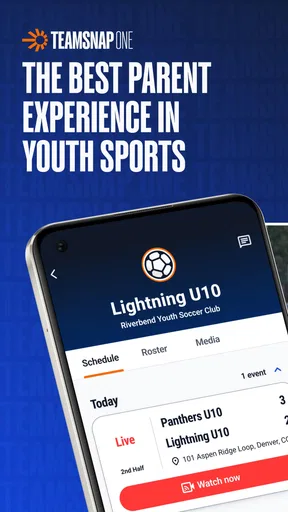
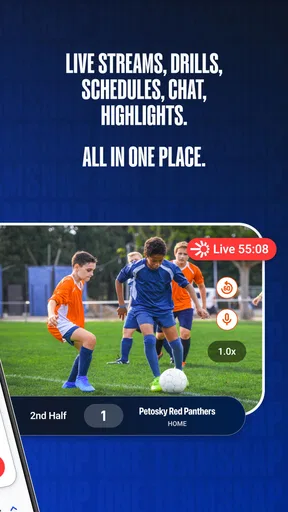
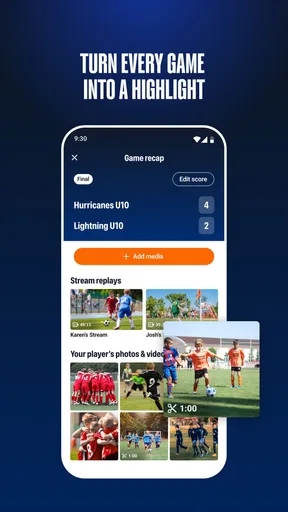
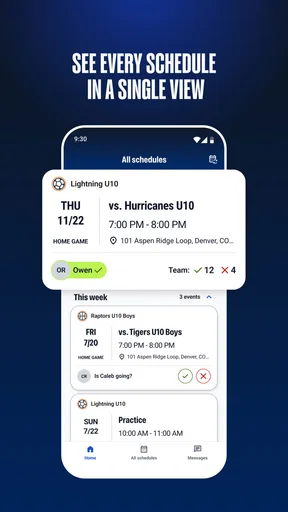
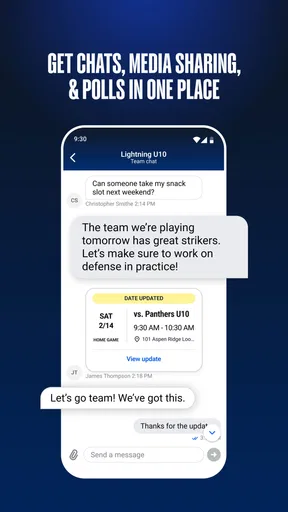
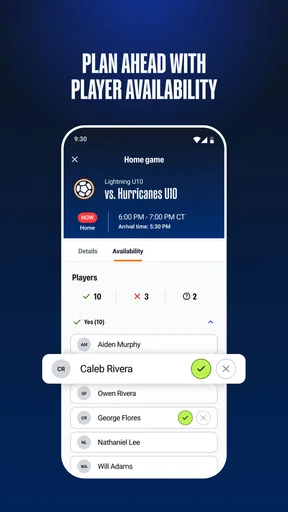

 Analysis by AppCompare
I approached TeamSnap ONE as a sports app for people who have been invited into a particular TeamSnap experience, rather than as a general-purpose tool that anyone can open and use immediately. That distinction matters more than the polished name. Its store summary describes an invite-only experience from TeamSnap’s innovation lab, so the first question is not simply whether the app looks useful, but whether you already have a legitimate invitation or a team connection that gives you a reason to enter it.
In my view, that makes this a more specialized download than the average sports app. It is free to install, carries an Everyone age rating, and comes from TeamSnap, Inc. The listing shows a 4.7 average from around 642 ratings and more than 100 thousand installs, which suggests that people who can access the experience are responding positively. Still, those figures should not be mistaken for proof that it will be useful to every athlete, parent, coach, or fan. Access is the central part of the decision.
What TeamSnap ONE actually offers its intended users
The clearest way to understand this app is to think of it as an entry point into a controlled sports experience. It is not presented as a broad directory of leagues, a public score-tracking service, or a replacement for every team-management product. The invite-only approach changes how I would recommend using it: install it when a club, organizer, or other authorized contact directs you to do so, and treat the invitation as part of the product experience rather than an optional extra.
That design can be useful for groups that want a focused digital space without asking every participant to search through a large public platform. A player may receive an invitation before a match, a parent may need access to follow a child’s team activity, or an organizer may want a particular group to use the same app. In each case, the value comes from joining the right environment. Without that connection, the download may feel empty or irrelevant even though the app itself is free.
I also appreciate that the product identity is relatively clear. TeamSnap ONE is not trying to disguise its limited availability as a universal sports companion. The store summary openly frames it as an innovation-lab experience, which tells me to expect something more focused and possibly evolving than a mature, all-purpose sports platform. That can appeal to users who enjoy trying a new workflow, but it also means I would not choose it blindly for a whole club before confirming how the invitation process works for that group.
Cost is simple at the download stage, but not the whole value question
The app is free, so there is no purchase required simply to download it. That makes trying it low-risk for an invited user. The listing also shows in-app purchases ranging from $9.99 to $69.99 per item. Those amounts are important because “free” describes the initial access, not necessarily every possible part of the experience. I would check what a team organizer or account owner expects before assuming that every function is included without payment.
That distinction is especially relevant for families. If one person receives an invitation, the sensible approach is to begin with the free installation and understand the available experience before spending anything. I would not pay just because a feature appears locked, and I would first ask the coach, club, or inviting organization whether the purchase is necessary for participation or merely optional. The app’s price range establishes the possible cost of an in-app item, but it does not by itself tell me which item a particular user will see or need.
Worth Reading Before You Choose

Flipboard Shows What News Apps Must Do Beyond the Feed

Switching to Android Auto Means Rethinking Your Driving Routine

Google Calendar Makes a Crowded Week Easier to Manage

Ludo King Makes the Most of the Minutes Between Plans

Baby Panda World Brings Quick Play to Modern Phones, but Its Game Library Feels Busy

ESPN’s Live Game View Makes Following Close Games Easier
For a casual sports fan with no invitation, the free price does not automatically create value. A free app that cannot be meaningfully entered is still a poor use of storage and attention. Conversely, for someone who has been invited into the intended experience, the absence of an upfront charge makes it reasonable to test the workflow before comparing it with paid alternatives.
How I would use it in an ordinary team situation
Imagine a parent receives a message from a youth sports organizer asking the family to join a TeamSnap ONE experience. I would install the app, use the invitation rather than trying to create an unrelated account path, and then check whether the expected team context appears. My first practical test would be whether the app makes it easy to identify the correct group and whether the information shown matches the child’s activity. If the invitation leads somewhere ambiguous, I would stop there and ask the organizer rather than creating multiple accounts or accepting a second invitation by mistake.
That small habit is more useful than it sounds. Invite-only services can become confusing when several family members use different email addresses or when a parent has access to more than one team. Keeping one consistent account identity and confirming the exact group at the start can prevent avoidable confusion later. I would also keep the original invitation message until access is working, since it may contain context that is not obvious once the app opens.
For an athlete, the workflow may be even more direct: accept the invitation, verify the correct team or experience, and use the app as the group has instructed. For a coach or organizer, I would treat the app as a participant-facing channel rather than assuming it replaces every administrative tool already in use. The invite-only model is strongest when everyone knows why they are there and what the app is expected to handle.
Where the app can deliver value
The main benefit is focus. A private or invitation-based experience can reduce the noise that comes with public sports platforms, especially when a user only cares about one team or one organized activity. Instead of browsing unrelated leagues or trying to locate a group manually, invited users can begin from a direct connection. That is a meaningful advantage for parents who want a clear destination and for players who do not need a broad sports network.
There is also a practical trust benefit. When access is tied to an invitation, the user has a clearer reason for seeing the experience. I would still pay attention to the account and group details, but the model is less dependent on discovering the right public listing through search. For a small team or a newly introduced program, that controlled entry can make onboarding feel more deliberate.
The app’s strong average rating is another encouraging sign, although I would interpret it carefully. Ratings often reflect the experience of people who successfully reached the intended product, while a person without an invitation may judge the app on a completely different basis. In other words, the rating supports the idea that the core experience can work well for its audience, but it does not remove the access question.
I see the innovation-lab positioning as both an opportunity and a warning. Users may get a fresh approach that differs from the usual team-management routine. At the same time, an experimental product may not fit every established club process. I would be comfortable testing it with a willing group, but I would avoid making it the only communication route for an entire organization until the team has confirmed that it supports the group’s real needs.
Specific tradeoffs that are easy to miss
The first tradeoff is convenience versus dependency. An invitation can make joining easy when it works, but it also means the user may depend on an organizer to gain access or resolve a problem. A public sports app may let me search, register, or explore independently; TeamSnap ONE is more controlled. That is helpful for the right community and frustrating for someone who expects immediate self-service.
The second is simplicity versus visibility. A focused experience may be easier to understand than a large platform, but users may have less freedom to discover other teams, events, or sports communities. I would choose this app for a defined relationship, not for broad exploration. If my goal were to compare local leagues or follow many unrelated competitions, I would look for a more open sports service instead.
The third is free entry versus uncertain paid relevance. Because the app costs nothing to install but includes in-app purchase items, I would separate “Can I get started?” from “Will everything I need remain free?” That is a useful question for any family budget. Before paying, I would identify who is requesting the purchase, what exact need it addresses, and whether the invited organization has already arranged access for participants.
A fourth tradeoff concerns change. The current version is listed as 1.39.0+production-release.6783, and the product is described as coming from an innovation lab. That combination tells me the app is actively presented as a specific, current build rather than an old abandoned download, but I would still expect the experience to develop over time. Users who dislike changing workflows may prefer a more established alternative with a long, familiar routine.
Who is likely to get the most from it
I would recommend TeamSnap ONE first to an invited player, parent, or participant who has a clear reason to join. It makes the most sense when an organizer has already selected the experience and the user wants to follow that direction without paying an upfront download fee. Families involved in organized sports are the most obvious audience, particularly when several people need access to the same invitation-based environment.
It may also suit users who prefer a dedicated team space over a general social feed. If the invitation leads directly to the relevant activity, that can feel calmer and more purposeful than sorting through unrelated sports content. I would especially consider it for someone who values a guided setup and does not want to build their own collection of teams or competitions manually.
Coaches and organizers should approach it more carefully. I would test it with a small group first, confirm that every intended participant can enter, and agree on what communication remains elsewhere. That trial is not a criticism of the app; it is simply sensible whenever an invite-only product is being introduced to people with different phones, accounts, and levels of technical confidence.
On the other hand, I would skip it if I had no invitation, if I wanted a public sports discovery tool, or if I needed a fully independent system that did not rely on a club or organizer. I would also hesitate if my priority were a predictable, mature workflow with no interest in trying an innovation-lab product. In those situations, a conventional team-management app or a public scores-and-schedules service would likely be a better match.
How it compares with familiar alternatives
Compared with a typical team-management platform, TeamSnap ONE appears more selective in how users enter the experience. The usual alternative may offer broader account creation, public discovery, or established tools that a coach can configure without waiting for a specific invitation path. That broader approach is better for independent organizers and users who want control from the beginning.
Compared with a sports news or scores app, this product has a different purpose. A news app is useful when I want coverage across many competitions, while an invitation-based experience is more relevant to my direct participation in a particular group. Comparing them only by the number of sports or teams they display would miss the point. TeamSnap ONE’s potential advantage is relevance, not breadth.
Compared with messaging apps, it may offer a more structured destination for a sports-related relationship, but I would not assume it replaces ordinary communication. Many teams still need a clear backup channel for urgent updates, especially while participants are learning a new app. If an organizer presents this as the only place to receive important information, I would want to know how access problems will be handled.
The free installation gives it a fair chance against paid alternatives, but the in-app purchase range means the comparison should continue beyond the download screen. A competing app with a clearer all-inclusive price may be easier to budget for, while TeamSnap ONE may be better value when the invited experience already meets the group’s needs without requiring an extra payment.
My verdict for invited users
I think TeamSnap ONE is worth trying when the invitation is genuine, the organizer has explained its purpose, and the group wants a focused sports experience. The combination of free installation, an Everyone rating, and a strong average rating makes the initial test easy to justify. I would begin without purchasing anything, confirm that I can reach the correct team or experience, and only consider an in-app item after understanding exactly what it provides.
My recommendation becomes much weaker for people browsing the sports category without an invitation. The app’s defining strength is also its biggest limitation: controlled access. That model can make the right experience feel clean and direct, but it leaves the wrong user with little reason to continue. I would not download it simply because the name sounds like a complete sports platform.
Overall, I see TeamSnap ONE as a targeted companion for invited sports communities, not a universal replacement for team administration, public sports discovery, or everyday messaging. The best value comes from belonging to the intended group before you install it. If that describes you, the free entry makes a cautious trial worthwhile. If it does not, I would skip the download and choose an app whose access model matches the way you actually follow sports.
Pros
- Combines team schedules
- rosters
- chats
- and updates in one place.
- Push notifications help families stay informed about last-minute changes.
- Supports multiple teams
- making it useful for busy sports households.
- Coaches can share announcements and important information quickly.
- Available on both Android and iOS for convenient access.
Cons
- Some features may require a paid team subscription or premium plan.
- The number of notifications can become overwhelming during busy seasons.
- Parents may need separate accounts to manage different player profiles.
- App performance can depend heavily on the team administrator’s setup.
- Not every sport or league may use all available TeamSnap features.
FAQs for TeamSnap ONE
What is TeamSnap ONE used for?
TeamSnap ONE is a team and club management platform designed to bring schedules, communication, rosters, availability, registration, payments, and other organizational tools into one place. After exploring the app, its main benefit is reducing the need for separate messaging, calendar, and administration tools. It is aimed primarily at sports teams, clubs, leagues, coaches, parents, players, and administrators.
Is TeamSnap ONE free to download and use?
The app may be free to download, but access to specific features can depend on the organization using it, the selected TeamSnap service, or an active subscription. Some teams or clubs may cover the cost, while administrators can enable paid registration, membership, or management services. Before downloading, check the pricing information and confirm with your organization which features and fees apply to you.
Can parents and players use TeamSnap ONE to view schedules and receive updates?
Yes. Team members and families can generally use TeamSnap ONE to access team schedules, event details, rosters, availability requests, announcements, and messages, depending on how their organization has configured the account. Notifications can make it easier to follow changes to practices or games. However, users must join or be invited to the correct team or organization to see its information.
Does TeamSnap ONE support registration and payments?
TeamSnap ONE can support administrative tasks such as registration, memberships, fees, and payment-related processes when those services are enabled by the relevant club, league, or organization. The exact options vary by setup, location, and account permissions. Parents or players should review payment totals, deadlines, refund policies, and any additional service charges carefully before completing a transaction through the app.
Is TeamSnap ONE suitable for managing an entire sports club or league?
TeamSnap ONE is intended to support more than a single team, making it potentially useful for clubs, leagues, and organizations that need centralized communication and administration. Its usefulness depends on the organization’s size, workflow, and subscription plan. Smaller teams may only use scheduling and messaging, while larger organizations may benefit from registration, payments, rosters, and broader administrative tools.


